







What you'll learn
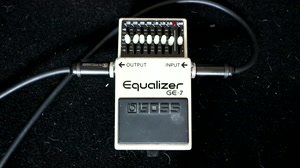
- Using a graphic EQ in the effects loop to fine-tune a metal tone after getting a tight sound from the amp.
- Pulling down the 800 Hz fader to clean up honky mids, but not so far that it sounds overly scooped.
- Adjusting the 100 Hz fader for tight low end, then cutting a little at 200 and 400 Hz to remove cabinet flub.
- Cutting 6.4 kHz to tame a shrill top end and adding a little at 3.2 kHz for cut.
- Raising the level control to make up for volume lost to scooping, and dialing in the tone at the volume you'll actually play.
In the final section, we'll take a look at how each of these faders effects the tone of the amp in practice. Every amp, speaker and cab is different, so you need to experiment to find the right settings, but this will give you a set of "guidelines" to start out with to help you dial in a crushing metal tone. Remember to dial in the tone at the volume you're going to play at! If you dial it in quietly and then take it to a gig, you can bet you'll be making adjustments on the fly!