
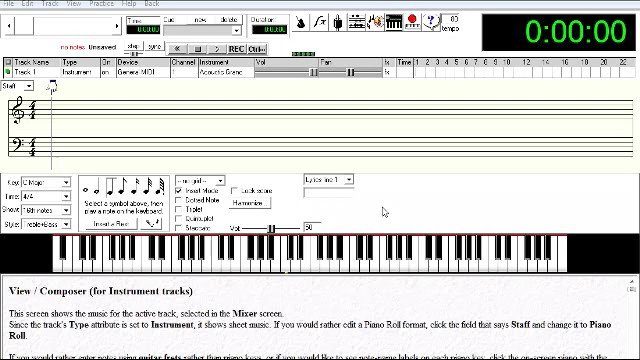
Anvil Studio Composing Software
Welcome everyone! In this tutorial, we're going to take a look at a software program called Anvil Studio. This software is an excellent tool for musicians who wish to compose and more. And best of all, it's free! Visit the following link to download your copy: www.AnvilStudio.com This tutorial is designed to give you an overview of the basic composing elements within this software. I highly recommend this program to anyone who wants to compose their own music, especially if you're a beginning composer. I used Anvil Studio for many years creating my own compositions. These days I'm now only using Cubase to compose and record. However, I wanted to do a tutorial on Anvil Studio because I think it's one of the best free composing programs that I've ever used. In the future, I'll be doing a tutorial on Cubase, covering composing elements as well as how to use virtual instruments. Now, go download Anvil Studio if you haven't already, and let's get composing! See you in the next video.
4 Lessons
-
1
1:32
Lesson · 2m Anvil Studio - Introduction and Installation
Welcome everyone! In this tutorial, we're going to take a look at a software program called Anvil Studio. This software is an excellent tool for musicians who wish to compose and more. And best of all, it's...
-
2
 4:00
Lesson · 4m Anvil Studio - Creating Instrument Tracks
In this video, we'll cover the basics of creating your first instrument tracks. Each instrument track can have a particular midi instrument assigned to it. As you'll see in the video, there are many...
-
3
 4:05
Lesson · 4m Anvil Studio - Creating Drum Tracks
Now let's go ahead and create a drum track. When you create a drum track in Anvil Studio, you'll have the option to select which particular drums you want assigned to your drumkit. I generally just use typical...
-
4
 8:39
Lesson · 9m Anvil Studio - Example Composition Riff
In this video, we'll compose a short example riff so you can get a general idea on how you can compose with Anvil Studio. Feel free to pause the video whenever necessary so you can follow the steps I'm taking...
More like this
 Playing Vintage Guitars
Sean Conklin
I am completely new to the world of vintage guitars. But I decided to take a plunge recently and got a refinished 1960 Fender Strat, and I absolutely love it! I wrote a new song with it for this tutorial. You...
 Eric Johnson Triads
Martin Miller
Hey friends, Today we’ll be dealing with a concept that has been fascinating me ever since I came across it: wide interval triads á la Eric Johnson, Steve Morse, etc. Firstly, let’s look at how these...
 Guitar Setup 101
Richard Lundmark
Welcome guitar slingers, to this behemoth of a tutorial on guitar set-up! Proper guitar set-up is something that everybody know is needed, but few know how to do. It’s sort of like the mechanics of a car. We...
 Right Hand Dynamics
Steve Hubbard
Hi there! Welcome to my tutorial on 'Right Hand Dynamics.' The point of this tutorial is to touch on various concepts, and techniques, that will help you develop a myriad of tones, sounds, and dynamic levels...
 Health and Safety for Guitarists
Sean Conklin
In addition to this lesson, be sure to check out an article I wrote on Guitarist Tendonitis. Stretching and warming up is critical for any guitarist. Playing guitar can be very strenuous on your fingers...
 Making of a Song - Deconstructing the Creative Process
Richard Lundmark
Greeting guitar slingers! In this tutorial we will analyze a song of mine, still in the making. The reason for choosing such a song, is to be able to more easily explain a bit about the creative process in...